 HostBar
macOS 14+ · Menu bar app
Did you leave that override on?
Profiles of hostname overrides for /etc/hosts that switch themselves off, a menu bar badge while they are on, and a panel that explains what a name resolves to and why.
14-day unrestricted trial. No account. One license, three Macs, a year of updates.
$ brew tap suresk/tap
$ brew install --cask suresk/tap/hostbar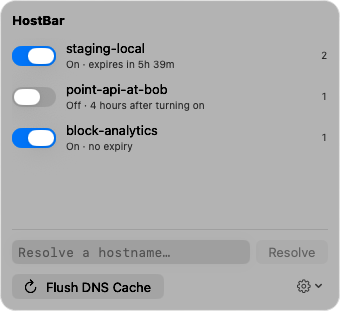
Default expiry. An override cannot silently outlive the debugging session.
Reads the same DNS configuration scutil --dns reads, and asks each server directly.
Edits one marked block in /etc/hosts, nothing else, and answers only to HostBar.
The forgotten override
Overrides that expire
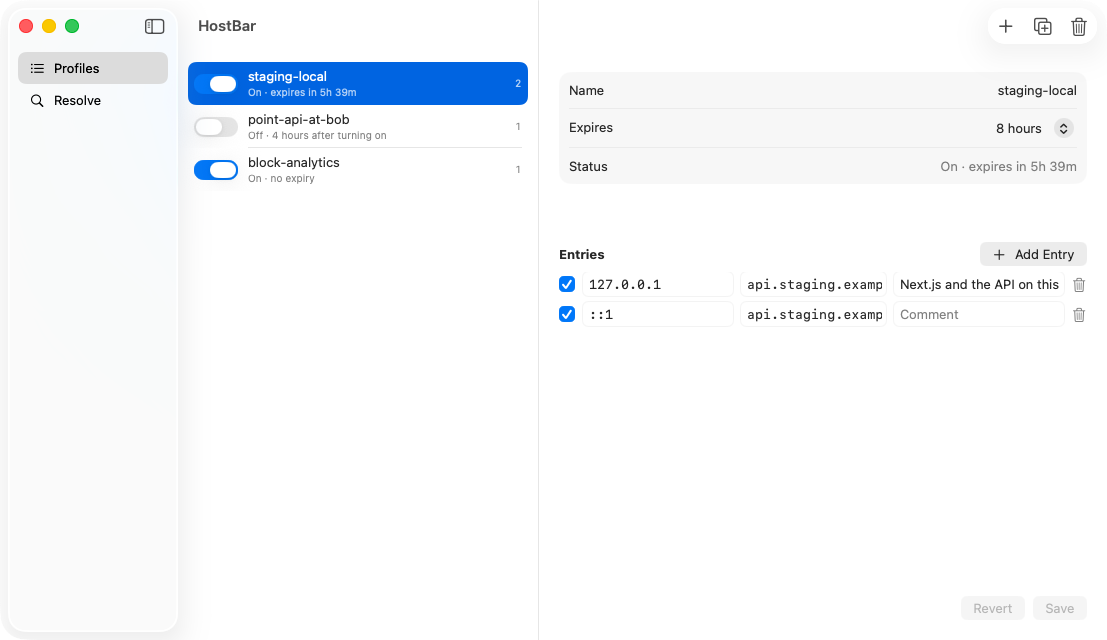
Point api.staging.example.com at localhost for an afternoon, not forever. Each profile has an expiry, eight hours by default. When it fires, HostBar turns the profile off, rewrites the file, and tells you. If your Mac was asleep, it catches up on wake.
Profiles are plain JSON in Application Support, so a team can keep "staging to local" in the repo.
The tell
You will know it is on
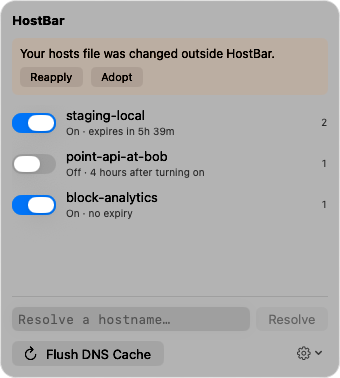
The menu bar icon carries a count while any profile is active. Open it and every override is one glance away, with the time left. If another tool rewrites the file, the icon turns into a warning and HostBar offers to reapply your profiles or adopt what is on disk.
The disagreement
Why does ping say one thing and the browser another?
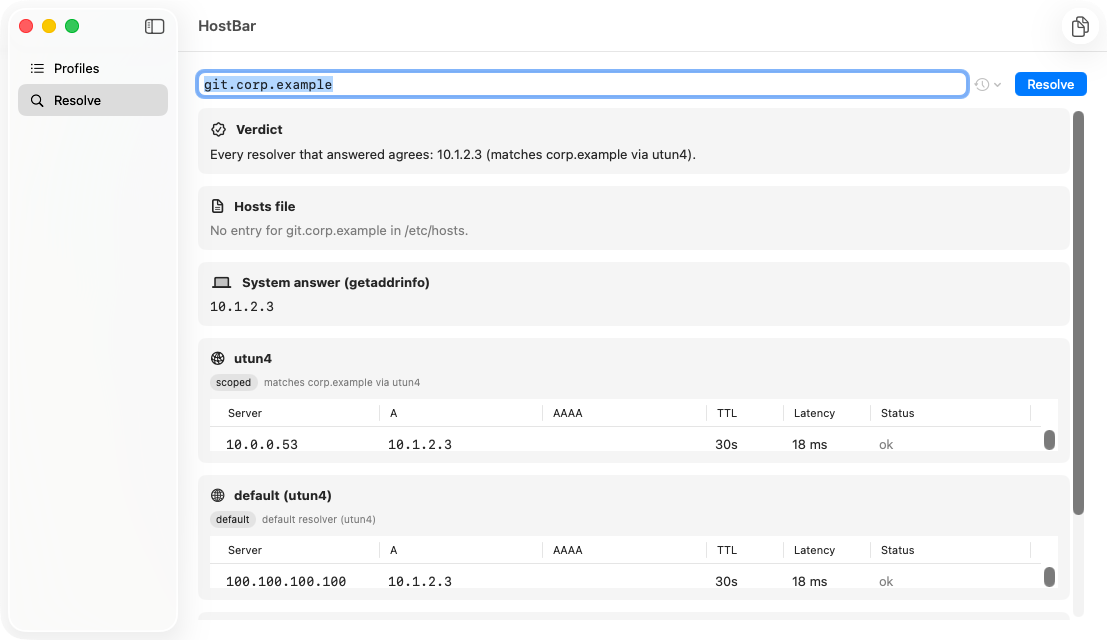
Type a hostname and see the chain: the hosts-file line (and which profile wrote it), what macOS answers, and what every configured DNS server answers, grouped by the resolver that would be asked: the default, the VPN's split-DNS scope, each /etc/resolver file. The verdict at the top says why they differ. Copy Summary pastes the whole thing into a bug report.
Why HostBar asks to install a helper
Root, narrowly
/etc/hosts belongs to root. The helper runs as root and can do two things: replace HostBar's marked block, and HUP mDNSResponder. It cannot write any other line and it refuses connections that are not HostBar's signed binary.
Visible in the file
The block starts with a comment naming the active profiles and when they expire, so anyone reading the file, or a security agent alerting on it, sees exactly what HostBar did.
Undo is exact
Turning a profile off removes precisely what it added. Everything outside the markers is byte-for-byte untouched.
Pricing
HostBar
$19 one-time
- Profiles, expiry, drift detection, resolve panel, flush
- Three Macs per license, deactivate yourself
- Twelve months of updates included; $9/year to keep them coming
- 14-day refund, no questions
Launch week: 25% off with code LAUNCH25.
Try it first
14 days, everything unlocked, no account. When the trial ends, everything stays visible and turning profiles off always works.
DownloadQuestions
Gas Mask is free. Why pay?
Gas Mask swaps whole hosts files. HostBar edits one block, expires it, shows you it is on, notices when something else edits the file, and explains resolution across VPN scopes and resolver files. Those four are the reasons; if you only need file swapping, keep Gas Mask.
Why root?
Because /etc/hosts is root-owned. The helper is the smallest thing that can edit it: two operations, a marked block, code-signature checks on every connection. Details above.
Why not the App Store?
The sandbox forbids writing /etc/hosts and installing a helper. Direct download, notarized by Apple, is the only way this app can exist.
Does it phone home?
Two calls: license validation and update checks. No telemetry. The resolve panel talks to your own DNS servers, only when you ask. See Privacy.
What happens when the trial ends?
You can still see everything and turn profiles off. Turning them on and flushing the cache need a license. An expired trial can never strand an override in your file.
What about .local names and Private Relay?
Bonjour names get one explanatory row instead of per-server queries, and Private Relay is out of scope for now. Unicast DNS, split DNS, and resolver files are what the panel explains.
Can I use one license on my work and home Macs?
Yes. Three activations per license; free one from the customer portal.