HostBar
Edit the hosts file on macOS
Open it
sudo nano /etc/hostsOr sudo vim /etc/hosts if you prefer vim. Either needs sudo, since the file is owned by root. TextEdit cannot save there because the file is owned by root and TextEdit runs as your user inside its sandbox.
The format
Each line is an address, whitespace, then one or more hostnames, with an optional comment after a #. A fresh Mac ships with a file that looks like this:
127.0.0.1       localhost
255.255.255.255 broadcasthost
::1             localhost
Add an override
Add a line for the address, then a second line for IPv6 if the app you are testing prefers it:
127.0.0.1 api.staging.example.com
::1 api.staging.example.com
Save the file, then test it:
ping -c1 api.staging.example.comUndo
Delete the line you added. It helps to leave a comment when you add it, so future you knows why it is there and when it is safe to remove:
127.0.0.1 api.staging.example.com # added 2026-09-16 for stagingPermissions
The file should be -rw-r--r--, owned by root:wheel. If sudo refuses to save with a permission error, check for a lock flag:
ls -lO /etc/hostsA uchg or schg flag in that output usually comes from a device management profile, not from anything you did. Ask IT to lift it rather than trying to force past it.
Or use a profile
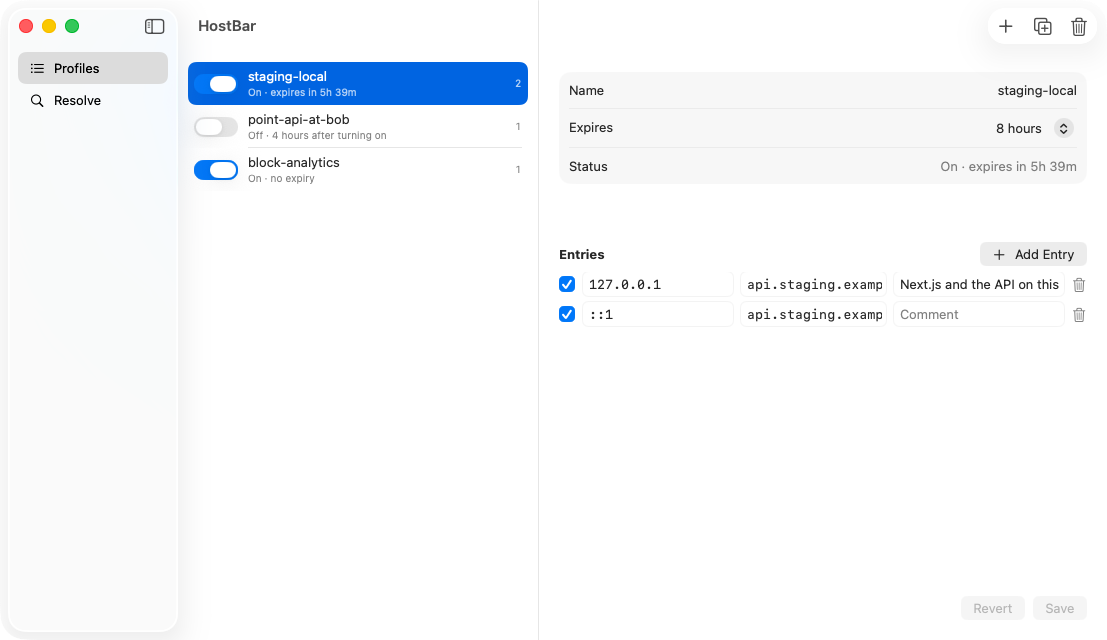
If you are adding and removing overrides often, editing the file by hand every time gets old fast. HostBar keeps each set of overrides in a clearly marked block and removes exactly the lines it added, on a timer if you want.
Overrides you can turn on and off
A HostBar profile is a named set of address-and-hostname lines you flip on and off, instead of editing the file by hand each time.