HostBar
Hosts file change not taking effect on Mac
Work through these from top to bottom; the fix is almost always one of the first three.
Check the file first
grep -n example.com /etc/hostsEach line is an address, whitespace, then a hostname, one address per line. A tab or plain spaces both work, and a trailing # comment is fine. 127.0.0.1 only covers IPv4 lookups; if the app you are testing prefers IPv6, add a second line with ::1 hostname.
Flush the caches
sudo dscacheutil -flushcache; sudo killall -HUP mDNSResponderHosts-file edits are usually picked up immediately, because mDNSResponder watches the file for changes. But if something already asked for that name before you edited the file, a cached positive or negative answer for it can stick around until it expires or you flush it.
The browser has its own cache
Chrome keeps a resolver cache separate from the system's. Open chrome://net-internals/#dns and click "Clear host cache". Safari uses the system resolver, but it keeps connections open, so a page you already loaded will not re-resolve until you quit and relaunch Safari.
Command-line tools are the quickest way to test, since curl and ping both use the system resolver:
curl -sv http://example.com 2>&1 | grep ConnectedA VPN or resolver file is answering first
scutil --dnsLook for scoped resolvers with their own domain lines. If the name you are testing falls under one of those domains, the hosts file still wins for normal lookups through getaddrinfo. But some tools bypass the system resolver entirely and never see hosts at all:
- dig, which talks to a DNS server directly
- nslookup, for the same reason
- Java, and some other runtimes and tools that carry their own resolver
First match wins
If two lines in the file name the same host, only the first one is used; the rest are ignored. Running the same check as above again shows both lines at once, so it is easy to spot which one is first.
Or let HostBar show you
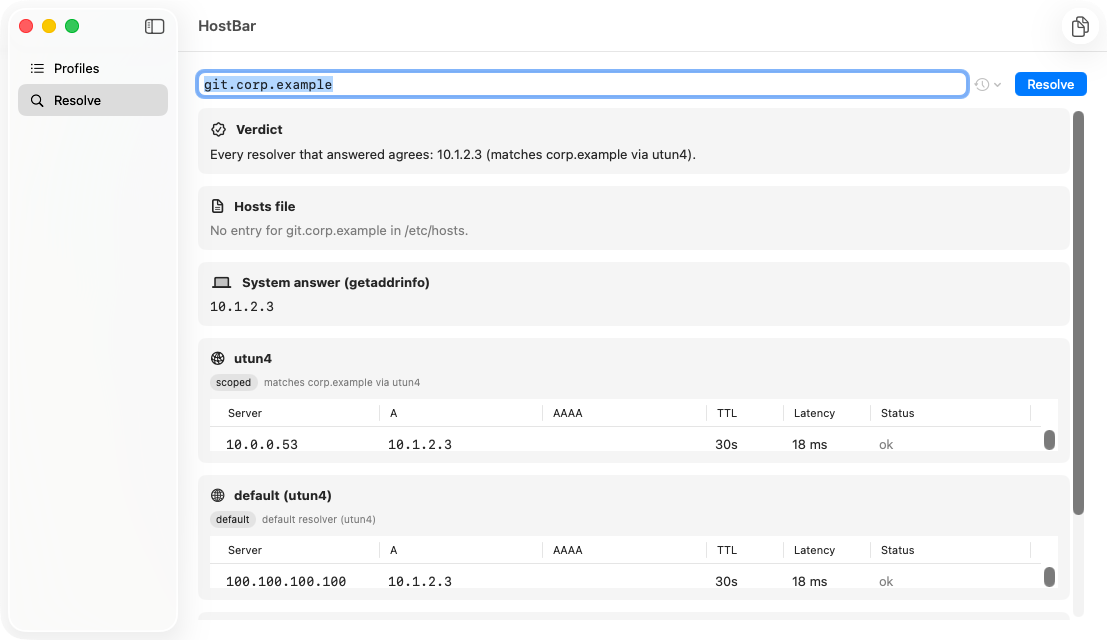
Instead of working through each of these by hand, HostBar's resolve panel shows the whole chain for a name at once: any hosts-file match, what macOS itself answers, and what each configured DNS server answers, with the reason each one applies.
See the whole chain at once
Type a hostname into HostBar and it lays out the hosts match, the system answer, and every server's answer side by side, so you do not have to run each command above separately.