HostBar
Reading scutil --dns on macOS
scutil --dns dumps every DNS resolver macOS currently knows about. It is dense, but each field answers a specific question.
Run it
scutil --dnsThe output is split into two big sections: "DNS configuration" is the default setup used for most lookups, and "DNS configuration (for scoped queries)" lists resolvers tied to a specific network interface, such as a VPN.
Each section is made up of numbered resolver blocks; read them top to bottom, since later blocks in the same section are usually more specific than earlier ones.
resolver #1
The first block is usually your default resolver: a list of nameserver entries and, often, search domains. Search domains are appended, in order, to any name you type without dots, so typing consul can quietly become consul.corp.example.
If you have more than one search domain configured, the first one that produces an answer wins, which is why the order they are listed in matters.
Blocks with a domain line
A block with a domain line is a supplemental resolver: it is only consulted for names that fall under that specific domain, not for lookups in general. This is where VPN split DNS shows up, and it is also where entries from /etc/resolver files appear — those always carry a domain line, but never an if_index, since they are not tied to any particular interface.
if_index and flags
A line like if_index : 33 (utun11) names the network interface this resolver is scoped to. Nearby flags tell you why the resolver exists: Scoped means it only applies to traffic on that interface, Supplemental means it only applies to its domain, and Request A records or Request AAAA records shows which record types it will be asked for.
reach and order
reach is a reachability bitmask describing whether the resolver's servers look reachable at all from the current network. The longest matching supplemental domain wins first; order only breaks ties between equally specific matches.
Where it all comes from
All of this is read out of SCDynamicStore, under keys like State:/Network/Global/DNS and State:/Network/Service/<id>/DNS. You can browse them directly with the interactive scutil shell:
scutil
> open
> show State:/Network/Global/DNS
HostBar reads these same keys directly instead of parsing the text output of scutil --dns, which is why it can show a resolver's fields even when the command-line formatting is ambiguous.
The short version
Default resolvers handle everything without a domain line. Supplemental resolvers, marked by a domain line, only handle names under that domain. if_index ties a resolver to one network interface. Lower order wins when two blocks both match.
Less reading
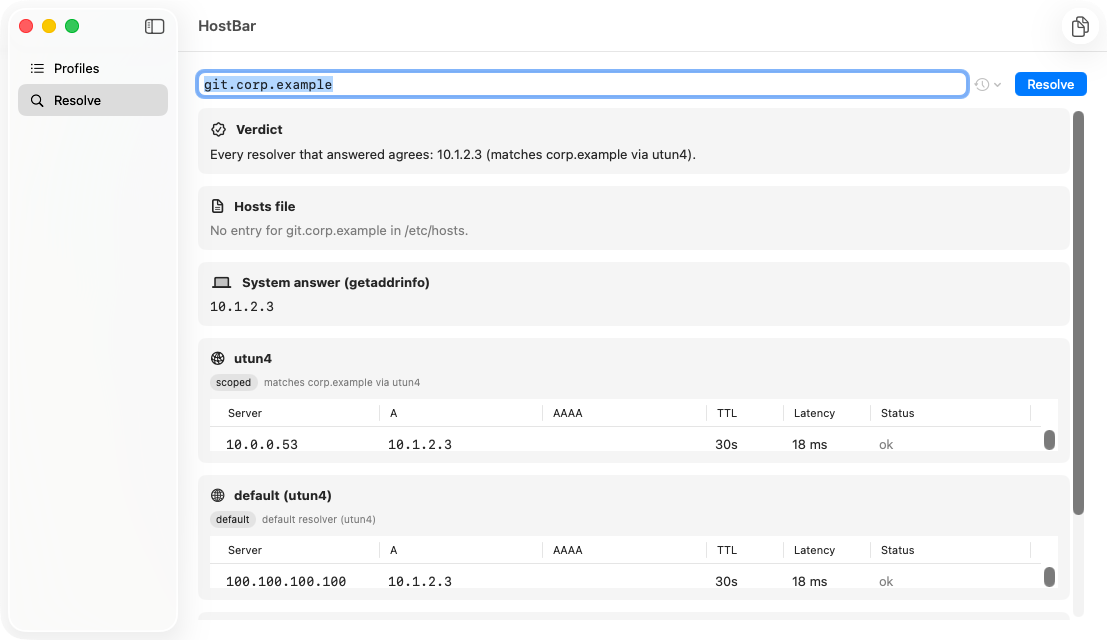
HostBar's resolve panel turns this whole dump into one card per resolver, each labeled with the reason it was chosen for the name you typed, so you do not have to scan raw scutil --dns output to find the block that matters.