HostBar
VPN is connected but internal hostnames do not resolve on Mac
The VPN is up, the tunnel shows traffic, but wiki.corp.example still fails to resolve. Here is what is actually deciding that.
How split DNS works on macOS
When a VPN client connects, it usually adds a scoped resolver tied to its own network interface, for example utun4, along with a list of SupplementalMatchDomains. Names that fall under one of those domains are sent to the VPN's DNS server; everything else keeps going to your normal, default resolver. Nothing else about your network configuration changes.
See the decision
scutil --dnsLook through the output for the resolver block whose domain line matches the name you are testing. The if_index field on that block names the interface the query will go out on, and if more than one block matches, the block with the lower order wins.
If you cannot find a block with a domain line matching your hostname at all, that is itself the answer: nothing is scoping that name to the VPN, so it falls through to the default resolver.
Reason 1: the domain is not in the match list
The most common cause: git.corp.example resolves fine, but wiki.corp.example does not, because only git.corp.example was ever pushed into the match domains. The VPN server never advertised the wiki's domain, so macOS never routes that name to it at all. Fixing this is on the VPN admin's side; adding an /etc/resolver file for the domain is a workaround, not a fix.
The workaround only helps if you already know which DNS server should answer for that domain; it does not make the VPN itself aware of the new domain.
Reason 2: search domains
A colleague types consul by itself and it resolves; you type the same thing and it does not. Their VPN pushes corp.example as a search domain, so their Mac quietly tries consul.corp.example for them. Check the search domain[0] line in the matching scutil --dns block, and when in doubt, type the fully qualified name instead of relying on the search list.
This is easy to mistake for a broken VPN, since the symptom looks identical to Reason 1 until you check whether the short name or the full name is what actually failed.
Reason 3: a cached answer from before the VPN
sudo dscacheutil -flushcache; sudo killall -HUP mDNSResponderIf you looked up the name before the VPN connected, or right after it dropped and reconnected, the earlier answer — often a failure — can still be cached. Flushing clears it and forces a fresh lookup through the current resolver configuration.
Testing without guessing
dscacheutil -q host -a name git.corp.exampleThis shows the system's view: whatever the scoped and default resolvers together produce. To rule out everything except the VPN server itself, ask it directly:
dig @10.0.0.53 git.corp.exampleIf the direct query to the VPN's server succeeds but the system view does not, the problem is in how macOS is routing the query, not in the VPN server itself.
Keep both results side by side before you change anything — it tells you immediately whether to look at the VPN's DNS server or at the Mac's resolver configuration.
HostBar's verdict
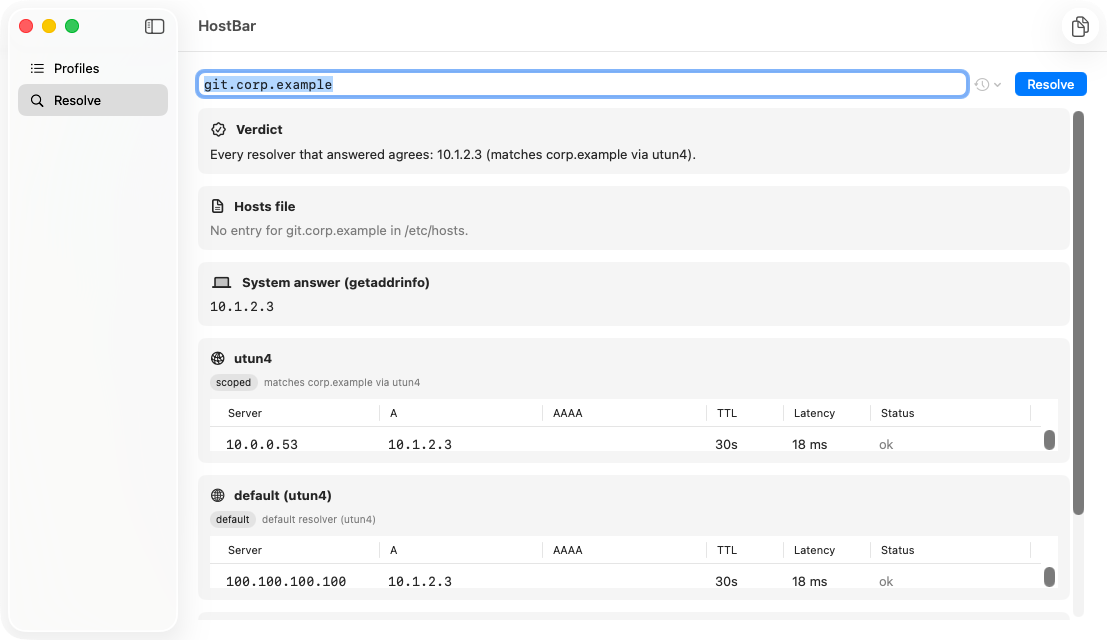
HostBar's resolve panel lists the scoped resolver first, labeled "matches corp.example via utun4", the default resolver second, and states plainly which one actually answered the query — no need to piece it together from separate scutil and dig runs.